The clip, its sound, its cover
The result panel for a clip holds two track lists and a cover download. Keeping all three is the closest thing to archiving the post as it appeared — the frame people saw while it loaded, plus the file itself.
Paste a TikTok link and SniffVid asks the parsers for what sits behind it. A clip here travels as three separate pieces — picture, sound and cover frame — so a complete copy means selecting from both track lists, and the thumbnail can be kept alongside them.
Illustrations show the workflow. Available formats and tracks depend on the actual result.
SniffVid TeamPublished Last reviewed
Paste a link above to see every available video, audio and cover download.
By using SniffVid you agree to our Terms of Service and Privacy Policy
These points describe the current download workflow. See the page-specific verification note below for what was checked; upstream availability and returned tracks can change.
The result panel for a clip holds two track lists and a cover download. Keeping all three is the closest thing to archiving the post as it appeared — the frame people saw while it loaded, plus the file itself.
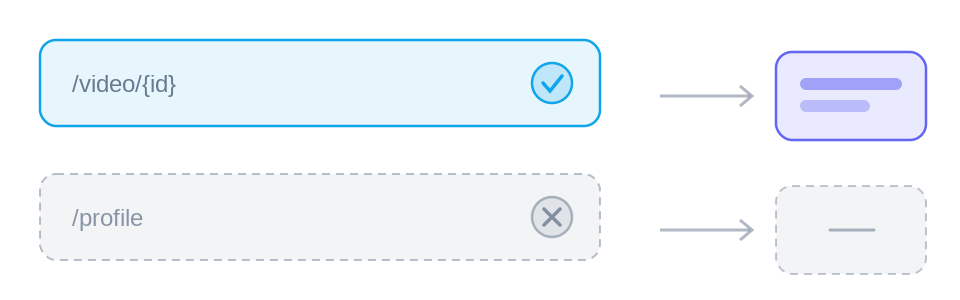
The share sheet hands out a vm or vt address stuffed with tracking parameters. It works here as pasted, but knowing the steady @handle/video/{id} form it expands to makes failures easier to reason about.
No redrawn frames and no re-encoded sound: the rendition on the label — watermark and all — is the rendition inside the file.
In the app, open the clip, tap Share and choose Copy link. That gives the short form; the desktop site shows the steady address in the bar. Either one is accepted as it comes.
Drop it into the box on this page and press Get Download Links. The short link is followed to the clip it names before the streams are listed.
Pick one row from the video list and one from the audio list, then merge into a single MP4 on a desktop. The cover frame saves separately, with or without the tracks.
Those are the shapes worth pasting. SniffVid accepts any other public http(s) link too — whether it resolves is up to the source, so a profile, a search page or a private post simply comes back empty.
Dancers and coaches save clips to scrub them slowly, half-speed, frame by frame — the parts a feed never leaves time for.
Keep the exact rendition you published, plus the cover the app generated, before an edit or a deletion changes the story.
Save the audio stream alone for a listening list — an interview clip, a language drill — with no app and no autoplay queue behind it.
A creator said yes, so the clip goes into the editing folder as a local file instead of a link that may not survive the week.
A TikTok post is not one file but a bundle: the picture stream, the sound it was cut to, and the still frame the feed showed while it loaded. The result panel mirrors that structure — two track lists and a cover download — and a complete archive of one post uses all three. Skipping the audio list is how silent files happen; skipping the cover is how the thumbnail gets lost.
The address the share sheet copies is a redirect wearing a long tail of tracking parameters. It names no clip itself; it points at a hop that leads to one. Parsers follow the hop without complaint, which is why pasting works as-is — but the address worth knowing is the steady @handle/video/{id} form it lands on, because that is the shape that survives app updates, regions and share-sheet redesigns.
Both lists arrive together: video renditions labelled with resolution, codec and size, and the audio streams offered beside them. One selection from each arms the merge action, and the cover download sits with them, so the three pieces of the post can be saved in one visit.
The stream the platform serves already contains the watermark and the moving username overlay — they are printed into the frames, not laid on top of them. A page that copies that stream copies them too, and a page promising a watermark-free version of the same rendition is promising a redraw rather than a download. What arrives here is exactly the picture TikTok serves, at the size and sharpness it serves it.
Not everything in the feed is a video. Photo-mode posts carry a slideshow of stills with one soundtrack, and the parser may return the audio and a cover while having no moving picture to offer — or nothing at all. Sound pages, hashtag pages and the Following feed are containers, and a live stream is a broadcast rather than a file. The empty results these produce are the shape of the post, not a fault in the link.
Joining two tracks needs the file-writing APIs of a desktop browser, so the phone takes the single-track route: the audio alone saves cleanly as a listening copy, and the video alone plays without sound — by design, not by failure. For the merged copy, any desktop with a current Chrome, Edge or Opera finishes the job in one visit, with nothing installed.
The share sheet's vm or vt form works for pasting, but the steady @handle/video/{id} address it lands on is the one worth testing. Open that form in a private window: private accounts, region-held and removed clips all show themselves there.
The cover frame is an ordinary image and needs no merge, no desktop and no pairing — it saves on any device in one tap. When archiving a post, taking the cover first is the cheapest insurance against the link going dark mid-visit.
The track addresses handed out by the panel have a life of about fifteen minutes. An interrupted merge is not a lost clip: parse again, pick the two rows again, and continue — nothing about the source changed in between.
These tables are shared across the site, so a figure you saw on one page is the figure you see here.
| When the platform… | The result panel shows | What you do |
|---|---|---|
| Serves one finished file | A single track with picture and sound already together | Use the offered save action without merging; completion still requires readable media and a supported browser. |
| Splits picture and sound | Two lists: video-only tracks and audio-only tracks | Choose one complementary track of each kind and merge in a supported browser; phones may have storage or memory limits. |
| Needs relaying or blocks browser reads | The same tracks, routed through a short-lived relay link | YouTube and X use relaying by default; merging chooses a transport automatically. For other single-file results, try the relay button if offered. |
| Task | Desktop | Phone | Why |
|---|---|---|---|
| Download a public link | Depends on source/browser | Depends on source/browser | Requires readable media from a provider; the parser does not inherit your platform login. |
| Download a private, paid or DRM-protected video | No | No | The source never hands the media to an anonymous reader, so there is nothing to copy. |
| Save one track | Depends on source/browser | Depends on source/browser | Requires a readable media file and browser saving support; a manifest alone is not a complete file. |
| Merge two tracks into one MP4 | Depends on source/browser | Depends on source/browser | Uses a save picker or temporary browser storage; browser support, quota and memory determine availability. |
| Convert between formats | No | No | No decoding or re-encoding: single files keep their supplied format, while compatible track pairs can be remuxed into MP4. |
| Remove a watermark | No | No | The file is the platform's own copy; nothing is edited or re-encoded on the way through. |
Checked by resolving a share-sheet short link, its expanded @handle/video/{id} equivalent and a profile page, and by saving the tracks and the cover of one clip, so the trio below is described from what actually downloaded.
Written and reviewed by SniffVid Team, the people who build and run SniffVid. Guides answer practical questions and are updated as capabilities change. Product promotions are labeled separately. Read the editorial policy
Published · Last reviewed · Content last reviewed
Primary documentation for the claims on this page. Nothing here cites another downloader as an authority on how downloads behave.
Choose another platform page, or try a public media link in the downloader. Availability depends on the parsing service.
SniffVid is an independent tool. It is not affiliated with, endorsed by or sponsored by ByteDance Ltd., TikTok or any of their affiliates. All trademarks belong to their respective owners.