Skip to content
Tutorial

Video download tutorials

Browse guides for getting started, saving on phones, working with audio and video, or troubleshooting downloads. Start with the task in front of you.

  • No account needed
  • Phone and desktop
  • Public links only

By SniffVid Team · 14 tutorials · Last reviewed

Bot protection

Paste a link above to see every available video, audio and cover download.

Find a guide by task

Choose from four categories below, with each guide listed once. Platform tool pages further down explain link-specific scope.

Start downloading

3 guides

Copy the right link, choose an available quality or save a returned cover image.

Saving on phones

2 guides

Save on iPhone or Android, then locate the downloaded file.

Audio and video

3 guides

Identify audio-only results and complementary tracks, then save or merge.

Download troubleshooting

6 guides

Diagnose failed downloads, unplayable or silent videos, verification and expired links.

Reference

These tables are shared across the site, so a figure you saw on one page is the figure you see here.

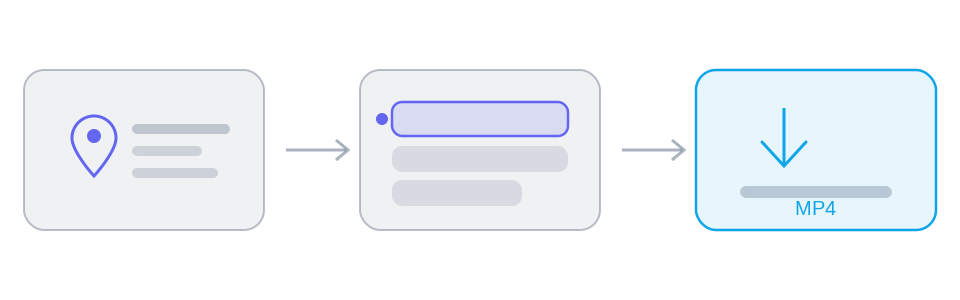
Three panels showing a video link, a list of available tracks, and the saved file.
Every download follows the same three stages: paste a link, choose from the tracks the parsers return, then save. The middle panel is where the decision happens.
How to read the result panel, by the way the platform serves its media
When the platform…The result panel showsWhat you do
Serves one finished fileA single track with picture and sound already togetherUse the offered save action without merging; completion still requires readable media and a supported browser.
Splits picture and soundTwo lists: video-only tracks and audio-only tracksChoose one complementary track of each kind and merge in a supported browser; phones may have storage or memory limits.
Needs relaying or blocks browser readsThe same tracks, routed through a short-lived relay linkYouTube and X use relaying by default; merging chooses a transport automatically. For other single-file results, try the relay button if offered.
Suggested link types for 17 platforms; examples do not guarantee download availability
Example URL shapesRecommendationScope and limits
youtube.com/watch?v={id} · youtu.be/{id}Try this typeTry a public watch page or youtu.be share URL. A channel or playlist is not a single video; availability depends on the provider.
tiktok.com/@{user}/video/{id} · vm.tiktok.com/{code}Try this typeTry a single public video or its original short share URL, keeping required parameters.
bilibili.com/video/BV… · b23.tv/{code}Try this typeTry one BV video page or a b23.tv share URL. Collections and restricted content may not return media.
x.com/{user}/status/{id} · twitter.com/{user}/status/{id}Try this typeTry the permalink of a public post containing video, rather than a profile.
weibo.com/tv/show/1034:{id} · video.weibo.com/show?fid=1034:{id} · m.weibo.cn/status/{id}Try this typeTry a public video page or an individual post. Use the media actually returned.
douyin.com/video/{id} · v.douyin.com/{code}Try this typeKeep the single video URL or original v.douyin.com share link intact.
xiaohongshu.com/explore/{id} · xhslink.com/{code}Try this typeTry an individual note or its original share URL. The video workflow does not imply image-gallery support.
instagram.com/reel/{id} · instagram.com/p/{id}Try this typeTry a public Reel or post. Usable video from a post with several media items depends on the provider.
facebook.com/watch/?v={id} · facebook.com/reel/{id}Try this typeTry an individual Watch or Reel URL. Visibility and source restrictions still affect availability.
reddit.com/r/{sub}/comments/{id}/… · v.redd.it/{id}Try this typeTry the video post permalink or its media address. Results may be complete files or complementary tracks to merge.
pinterest.com/pin/{id} · pin.it/{code}Try this typeTry a public video Pin or pin.it share link. Image Pins and boards are outside this video-save workflow.
threads.com/@{user}/post/{id} · threads.net/@{user}/post/{id}Try this typeUse one video-post URL without manually changing its threads.com or threads.net hostname.
vimeo.com/{id} · player.vimeo.com/video/{id}Try this typeTry a public video page or player URL. Private, password-protected or playlist-only results are not guaranteed to download.
dailymotion.com/video/{id} · dai.ly/{id}Try this typeTry one public video or its dai.ly share URL. Live or restricted content is not guaranteed.
clips.twitch.tv/{slug} · twitch.tv/{channel}/clip/{slug}Try this typeThese examples focus on public Clips, without promising channel live streams, full broadcasts or subscriber content.
snapchat.com/spotlight/{id}Try this typeTry a public Spotlight URL. Private Snaps, chats and Stories are outside this guidance.
soundcloud.com/{artist}/{track}Try this typeTry a public single-track URL. This does not imply playlist, paid-track or MP3-conversion support.
/{user} · /profile · /searchAvoidProfiles, channels and search pages are not single-media URLs. Copy an individual post, Clip or track URL.
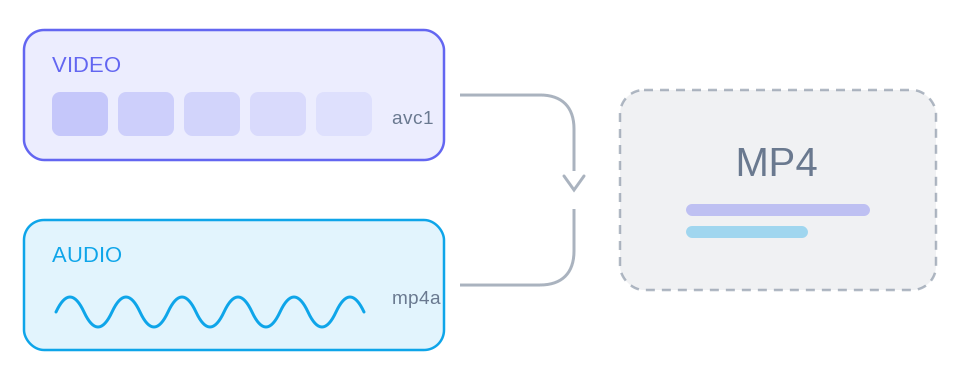
A video-only stream and an audio-only stream joining into a single MP4 file.
A platform that offers several resolutions stores picture and sound separately. Taking both and merging them gives you one file; saving only the top box gives you a silent one.

Choose the guide for the result you have

A complete file, an audio-only result and separate video/audio tracks need different actions. Each guide names the controls currently available and the limits that apply.

Use platform pages for link-specific instructions

The dedicated platform pages describe candidate link shapes and supported scope. A platform name is not a promise that every post, format or access setting will resolve.

Read examples as examples

Generated artwork is conceptual, not a product screenshot. Size ranges are illustrative. Actual formats, browser support and upstream availability can change.

Tool pages for the biggest platforms

Dedicated pages combine the downloader with platform-specific link instructions and limits. Choose one below.

Content last reviewed