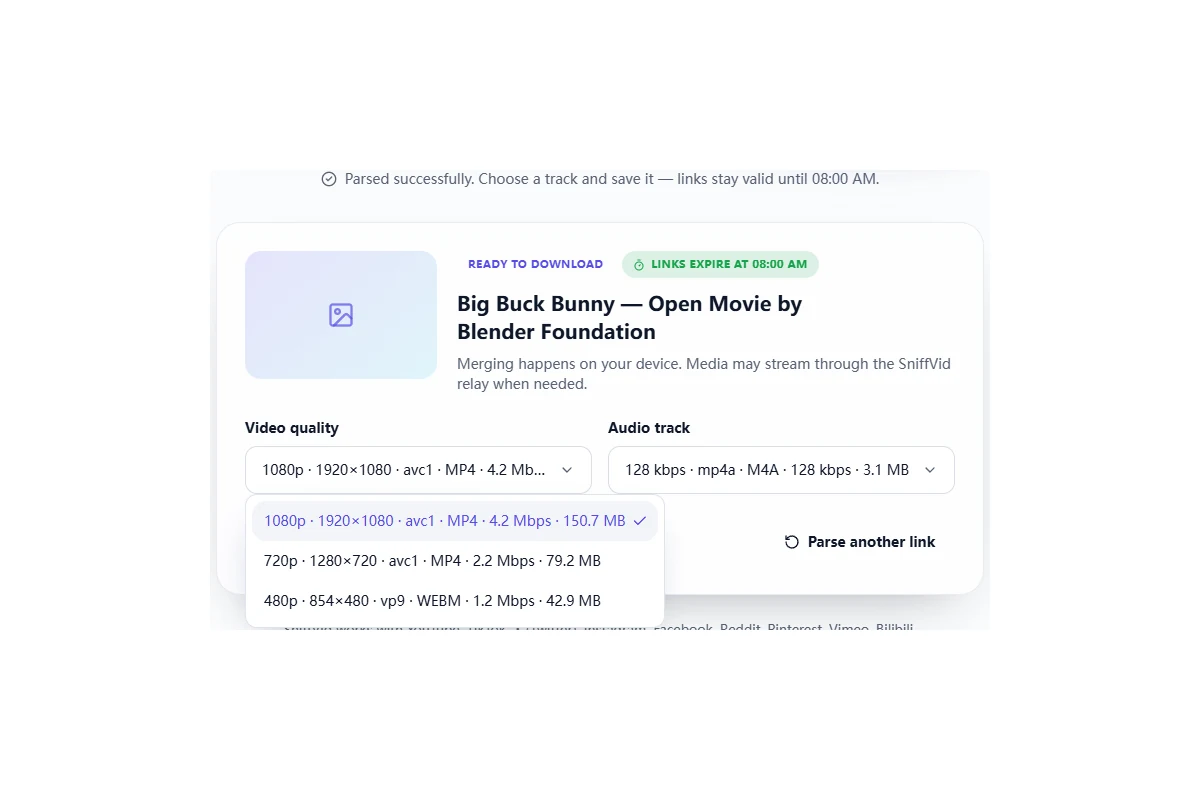
Compare resolution, duration, bitrate and codec when the parser supplies them. Choose the smallest returned option that suits your use.
What 720p and 1080p tell you
They refer to pixel dimensions, not sharpness by themselves. Vertical and differently cropped videos may use other dimensions. Frame rate, codec and the quality of the original also affect the result.
Why the largest file is not always best
Compare versions of the same duration with similar codecs. A more efficient codec may use fewer bytes without looking worse; simply sorting by file size is not a quality test.
Estimate storage without a fixed-size promise
If bitrate and duration are known, total bitrate in kb/s × seconds ÷ 8000 gives roughly decimal MB. For separate streams, add video and audio estimates and leave room for temporary storage.
When higher quality is missing
The source, access rules or parser may expose only some versions. SniffVid does not upscale or create a missing 4K option. A fixed format list is not guaranteed for any platform.
Reference
These tables are shared across the site, so a figure you saw on one page is the figure you see here.
| Quality | Example size (10 min) | Best for |
|---|---|---|
| 1080p | 100–300 MB | Archiving, editing, or watching on a large screen |
| 720p | 50–150 MB | Phones and laptops, and anything that has to download quickly |
| 480p | 20–60 MB | Slides, talking heads and note-taking, where fine detail hardly matters |
| M4A | 5–15 MB | Listening, transcription, or saving data on a long video |
Background and edge cases
A practical starting point
Choose an available moderate resolution for casual viewing, an audio-only result for listening, and a compatible higher-detail version for editing or archiving. Check the result rather than assuming a label is enough.
Reading the comparison table
The ranges below are illustrative examples, not measurements of your link. Actual size changes with duration, motion, frame rate, bitrate and codec.